What to Ask
The assistant works from a fixed set of things it can look up. This page turns that set into questions you would actually type, grouped by the job you are doing rather than by the page the data lives on. Everything here works in the in-app chat, in Slack and on WhatsApp. Use the wording as it stands, or swap in your own device and sensor names.
Your morning check
Ten minutes before anyone else is at their desk, you want three things: did anything break overnight, is every device still talking, and is yesterday's alarm still sitting there unowned. Ask these top to bottom in one conversation and you have your morning, without opening a single page.
- Give me a summary of our setup. — how many devices and sensors you have, and how many alarms are open.
- Which devices are offline right now? — every device currently offline, with how long ago each was last seen.
- Which sensors are outside their thresholds? — the sensors currently in breach, so you know where to look first.
- Show me only the critical ones. — the same list narrowed to a minimum severity; ask for warning, major or critical.
- What alarms are still open? — open alarms newest first, with severity, where each came from, when it started, how many times it re-triggered, and whether anyone has acknowledged it.
- How many messages did we send today, and did any fail? — counts by outcome across email, SMS and WhatsApp for today.
- Which battery devices are under 20 percent? — battery-powered devices below the level you name.
Something is wrong right now
Someone has phoned, or a message has landed, and you need to know how bad it is before you decide who to send. Start by naming the thing, then narrow: one device, then one sensor, then how that sensor compares to normal. Keep it in the same conversation so you can say "it" instead of typing the name again.
- Find the device called Cold Store 2. — the matching device, so you and the assistant are talking about the same one.
- Tell me about Cold Store 2 and its sensors. — that one device in detail, with every sensor attached to it.
- What was the temperature in Cold Store 2 over the last 24 hours? — minimum, maximum, average, and the number of readings behind those figures.
- Is it running warmer than last week? — the same sensor measured against the period before it.
- Compare the three cold room temperature sensors over the last 24 hours. — one window across several sensors side by side.
- Which sensors are in alert at major severity or above? — the breaches worth waking someone for.
- Which devices are in error? — devices reporting an error state, rather than ones that have simply gone quiet.
- How many alert messages failed this week? — counts by outcome per channel for the week, so you know whether the warning actually got out.
- Who changed what in the last few days? — recent entries from the audit trail.
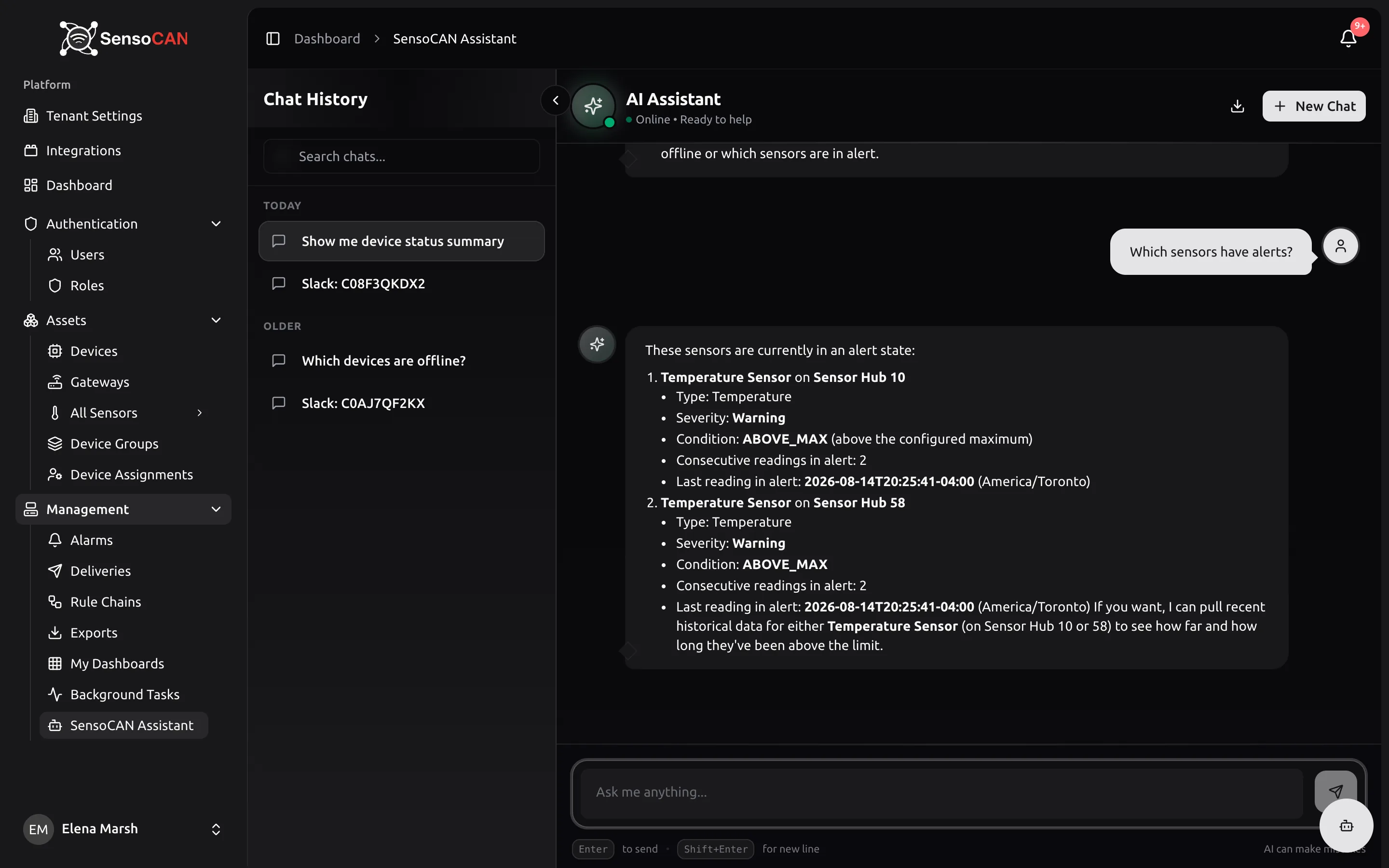
Asked without the severity filter, that sensor-alert question looks like this in full:
Which sensors have alerts?
These sensors are currently in an alert state:
- Temperature Sensor on Sensor Hub 10
- Type: Temperature
- Severity: Warning
- Condition: ABOVE_MAX (above the configured maximum)
- Consecutive readings in alert: 2
- Last reading in alert: 2026-08-14T20:25:41-04:00 (America/Toronto)
- Temperature Sensor on Sensor Hub 58
- Type: Temperature
- Severity: Warning
- Condition: ABOVE_MAX
- Consecutive readings in alert: 2
- Last reading in alert: 2026-08-14T20:25:41-04:00 (America/Toronto)
If you want, I can pull recent historical data for either Temperature Sensor (on Sensor Hub 10 or 58) to see how far and how long they've been above the limit.
AI can make mistakes
A real conversation with the assistant; the organisation name has been changed.
Notice how the answer ends with an offer: that is your follow-up, ready made. Reply "yes, the one on Sensor Hub 10" in the same conversation and you get the history without naming the sensor again.
Planning maintenance
This is the batching work: which batteries to carry on the van, which sites to visit, which sensors have quietly stopped pulling their weight. These questions all take a period, so give one — "the last 7 days", "the last 30 days" — and you get a figure you can put in a plan.
- Which battery-powered devices are under 15 percent? — this week's van run, in one list.
- Which devices have been offline longest? — the offline list with last-seen times, so the longest silences stand out.
- List all my devices sorted by when they were last seen. — the whole estate ordered by last contact.
- What device groups do we have, and how many devices are in each? — your groups with their device counts.
- List all humidity sensors with their latest values. — every sensor of one type, with what it is reading now.
- Which sensors sent the most readings in the last 7 days? — the busiest sensors by reading count, which is where a misconfigured reporting interval shows up.
- How have alarms trended over the last 30 days? — alarms raised per day across the period.
Reporting to a customer or manager
Here you are not troubleshooting, you are evidencing. Ask for the figure and the period you intend to quote, and ask for the export in the same breath so the numbers in your email and the numbers in the attachment came from the same request.
- What did Freezer 1 average over the last 7 days, with its minimum and maximum? — one sensor summarised over the period, with the reading count behind it.
- Compare Freezer 1 and Freezer 2 over the last 30 days. — both sensors over one window, for the paragraph where you say the two rooms behaved the same.
- How many critical alarms were raised per day over the last 90 days? — a daily count for a single severity.
- How many messages did we send this month, and how many were delivered? — counts by outcome per channel for the month.
- Give me the headline numbers for the organisation. — device and sensor counts and open alarms: the sentence a monthly report opens with.
- Export the last 30 days of temperature data for the Warehouse group. — queues an export by device, device group or sensor type; it is produced in the background and emailed to you when it is ready.
- Export the last 7 days for Cold Store 2 as a PDF. — the same request, narrowed to one device and a file format.
Checking your setup
The assistant is unusually good at catching the thing you configured months ago and forgot. A chain switched off during a test, a device carrying no sensors, a location field nobody filled in — all of it is one question away.
- Which rule chains do we have, and which are active? — your rule chains with their status, which is the fastest way to spot one that was switched off and never switched back.
- Show me only the active rule chains. — the same list, filtered.
- Tell me about the gateway in the north warehouse. — one device in detail, with everything currently reporting through it.
- Find every device in the Riverside plant room. — devices matched on location as well as on name, so an empty answer means the location field is empty too.
- Which door sensors do we have, and what are they reading? — sensors of one type with their latest values.
- List my devices sorted by sensor count. — the estate ordered so that a device with nothing attached to it stands out.
- Who has been active in the platform this week? — recent activity from the audit trail.
Asking well
Three habits make the difference between a useful answer and a vague one.
Name the thing. "Freezer 1" beats "the freezer", and "Cold Store 2" beats "the cold room". The assistant matches on the names and locations you typed into Devices and Sensors, so the closer your question is to those, the less it has to guess.
Name the period. "Last 7 days", "the last 24 hours", "since the first of the month" — a question with no period gets an answer over whatever window the assistant picks. Very long periods are answered over a bounded window, so ask for a month at a time when you are covering a year.
Follow up in the same conversation. Each conversation carries the recent turns as context, which is what lets you ask "and the humidity?" or "what about last week?" without repeating yourself. When you change subject completely, start a new chat instead — it is cleaner than dragging an unrelated device along behind you.
One more thing worth knowing: if the assistant finds nothing, it says so rather than inventing a figure. An empty answer is information — usually that the data was never stored, or that the device is not assigned to you. Ask SensoCAN covers both, along with the permission rules that decide what you can see.