Device Connectivity
This chapter is the contract your hardware speaks to SensoCAN. Your device sends readings, SensoCAN matches each one to a sensor you have configured, and hands it to that sensor's rule chain. Dashboards, alarms and exports all run on what arrives here.
Two protocols carry the same payload:
- MQTT — one persistent connection, publish whenever you have data.
- HTTP — one request per reading or batch, no connection to hold open.
Using a supported BLE gateway instead of your own firmware? See the Gateways & Beacons chapter.
Choosing a protocol
| MQTT | HTTP | |
|---|---|---|
| Connection | Persistent, kept open | One request at a time |
| Feedback per message | None | Full: counts of accepted, duplicate and rejected readings |
| Overhead per reading | Very low | A TLS handshake and headers per request |
| Firewall friendliness | Needs an outbound port open | Ordinary HTTPS |
| Offline backfill | Supported | Supported |
| Best for | Battery devices, high reporting rates, cellular links | Devices behind restrictive networks, gateways with an HTTP stack only, bring-up and debugging |
An MQTT publish tells you the message left the device; it cannot tell you the reading was understood, because there is no reply channel. Every HTTP request answers with what happened to each reading in it. When bringing firmware up, send one HTTP request first and read the response, then switch to MQTT once the payload is right.
What you need from the platform first
Everything your firmware needs is on the Device Details page: open Devices and click the device name.
| Value | Where to find it | Used for |
|---|---|---|
| Device UUID | Device Information card, with a copy button | MQTT client ID; part of every HTTP URL |
| MQTT topic | Device Information card, shown in full with a copy button | The device-level publish topic |
| MQTT username and password | MQTT Credentials button | Connecting to the MQTT host |
| Access token | Show Token button | The HTTP Authorization header |
| Sensor slug and sensor UUID | Sensors table → open a sensor | Addressing a reading to one sensor |
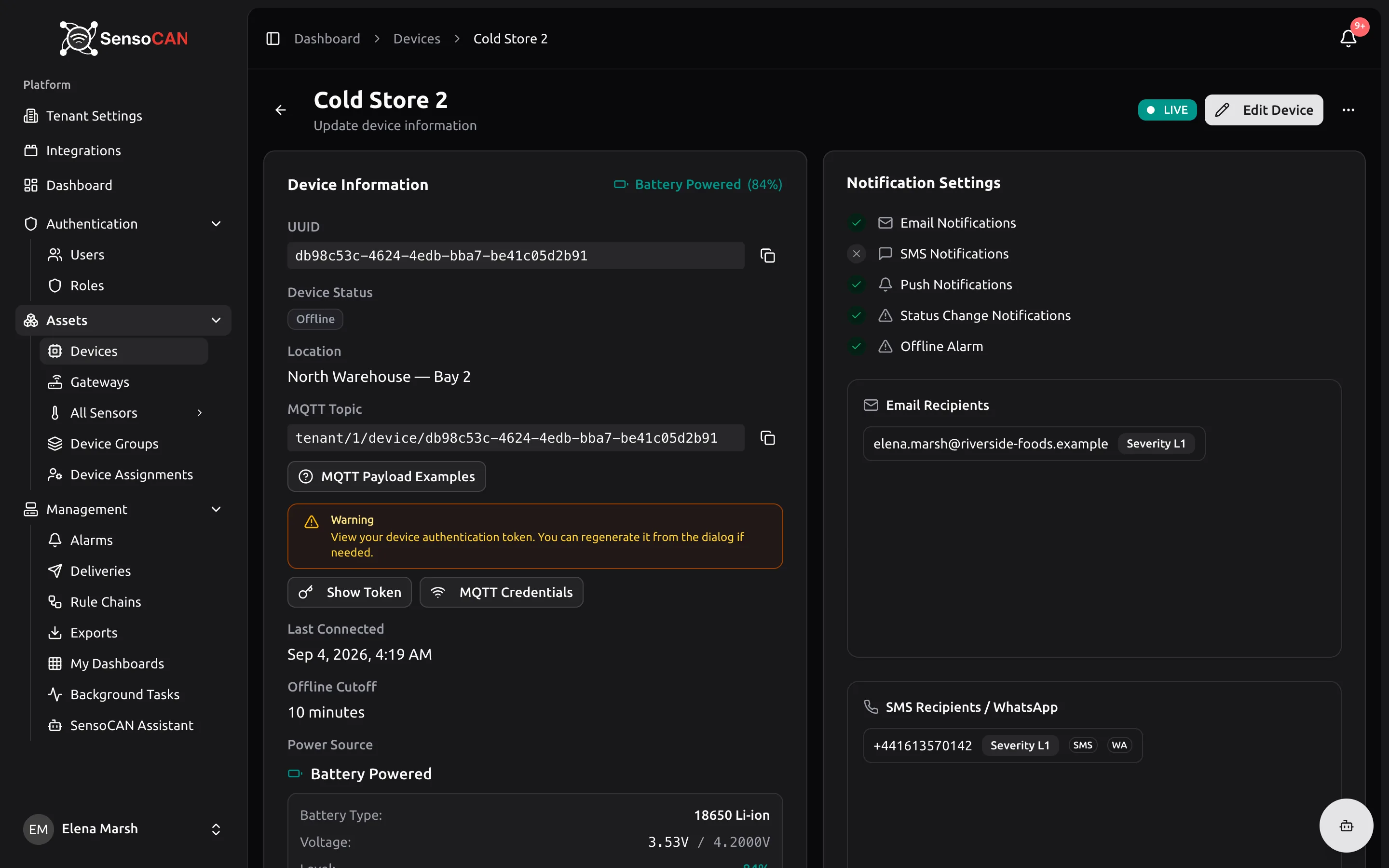
Do not assemble topics or URLs by hand. The page prints the finished topic, and the MQTT Payload Examples button beside it opens ready-made topics and payloads filled in with this device's real identifiers.
Anyone holding the access token or the MQTT password can send readings as this device. The access token can be regenerated at any time from Show Token, which invalidates the old one immediately and locks the device out until you flash the new value. The MQTT password cannot be rotated the same way — if it needs to change, it is only reissued automatically if the stored credential is ever lost or fails to decrypt.
Payload rules both protocols share
Wrap readings in data. Every payload has a top-level data key holding either one reading object or an array of them. Nothing outside data is treated as a reading.
value is required, and should be a number. Over HTTP a non-numeric value is rejected. Over MQTT nothing rejects it, but rules, charts and exports all expect a number.
timestamp is optional. Send ISO 8601 (2026-09-03T10:00:00Z). Omit it and the reading is stamped with the time it arrived.
Device clocks are corrected, not punished. If the newest timestamp in a payload runs ahead of the time it arrives — a fast device clock — the whole payload is shifted back by that one offset: the newest reading lands at arrival time and the spacing between readings is preserved. Nothing is dropped for being "in the future", so you never need to check the clock before flushing a buffer. Corrected readings record the shift they were given as clock_offset_seconds in their stored metadata, so corrected data stays distinguishable from measured data. Timestamps in the past are stored as sent, which is ordinary offline backfill.
battery_voltage sits beside data, not inside it. Send the voltage in volts as a number; 0 to 100 is accepted, so a lithium cell reporting 3.7 is typical. Device Details shows it as Voltage against the battery type configured for the device and derives the Level percentage from the two. It is ignored for devices set to direct power. Over MQTT, you may also publish battery_voltage alone, with no data key at all, on any topic. Over HTTP, every request must include a data object or array — there is no battery-only endpoint.
Extra keys ride along. Any other key inside a reading object is kept as metadata and can be read by rules — firmware version, signal strength, sample count. Up to 30 keys per reading, single values only (no nested objects or arrays), key names up to 64 characters, text truncated at 512.
Repeats are suppressed. For some sensor types, the same value sent again for the same sensor within a few seconds is not processed twice. Replaying a buffer is safe — a duplicate is never an error.
Accepted is not the same as stored
An accepted reading is handed to the rule chain that applies to that sensor, and that chain decides what happens next — including whether the reading is saved. Every account starts with a Default Rule Chain that saves everything it receives. Replace it with a chain of your own that has no save step and your device will keep being told its readings were accepted while nothing appears on the device page. Check the chain under Management → Rule Chains before you suspect your firmware.