HTTP API
The HTTP API suits devices that cannot hold a connection open, networks that allow only ordinary HTTPS, and firmware bring-up — because unlike MQTT, every request answers with what the platform made of each reading you sent.
Base URL
https://api.sensocan.com/api/v1
Authentication
Every request carries the device's access token as a bearer token:
Authorization: Bearer {DEVICE_ACCESS_TOKEN}
Get the token from Device Details → Show Token. The token belongs to one device and the URL you post to must be that same device's UUID.
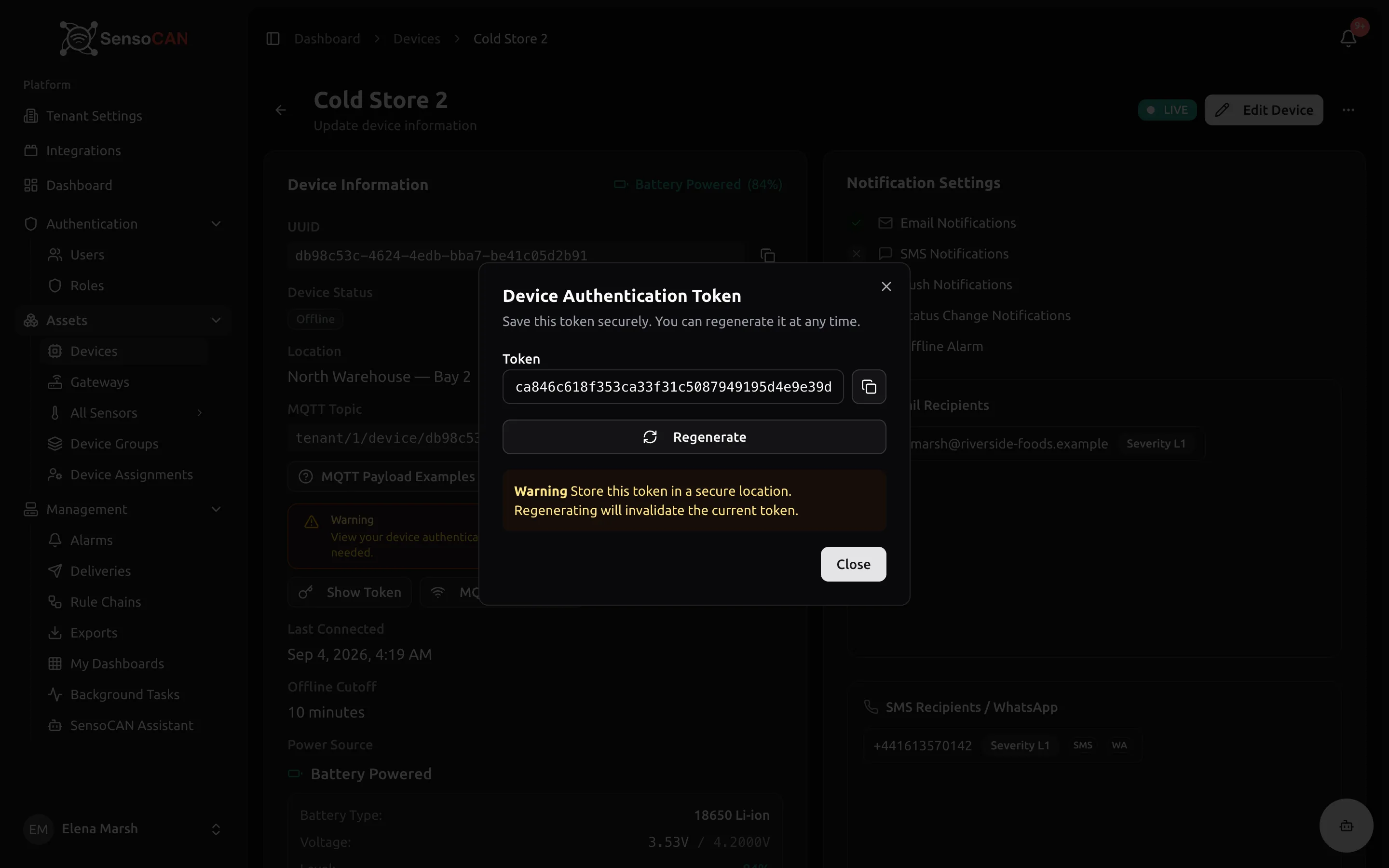
The regenerate action in the same dialog issues a new token and invalidates the old one at once. Every device using the old token starts getting 401 until you flash the new one.
Headers
| Header | Value | Required |
|---|---|---|
Authorization | Bearer {DEVICE_ACCESS_TOKEN} | Yes |
Content-Type | application/json | Yes |
Accept | application/json | Recommended — without it, the rate-limit response comes back as an HTML page instead of JSON |
Endpoints
1. One reading for one sensor
POST /devices/{device_uuid}/sensors/{sensor}/readings
{sensor} is either the sensor's slug or its UUID — both are shown on the sensor's page.
{
  "data": {
    "value": 25.5,
    "timestamp": "2026-09-03T10:00:00Z"
  },
  "battery_voltage": 3.7
}
| Field | Type | Required | Notes |
|---|---|---|---|
data | object | Yes | Exactly one reading. Use the bulk endpoint for several |
data.value | number | Yes | Non-numeric values are rejected |
data.timestamp | ISO 8601 string | No | Defaults to the time the request arrives |
battery_voltage | number (volts), 0–100 | No | Sits beside data, not inside it |
Any other key inside data is kept as metadata with the reading — see the shared payload rules.
2. Several readings for one sensor
POST /devices/{device_uuid}/sensors/{sensor}/readings/bulk
{
  "data": [
    { "value": 22.1, "timestamp": "2026-09-03T09:00:00Z" },
    { "value": 22.4, "timestamp": "2026-09-03T09:15:00Z" },
    { "value": 22.8, "timestamp": "2026-09-03T09:30:00Z" }
  ],
  "battery_voltage": 3.6
}
data must be an array with at least one entry. Each entry follows the same rules as data above.
3. Readings for several sensors
POST /devices/{device_uuid}/readings
{
  "data": [
    {
      "sensor_slug": "temp_01",
      "value": 25.5,
      "timestamp": "2026-09-03T10:00:00Z"
    },
    { "sensor_uuid": "7a8b9c0d-1234-5678-90ab-cdef12345678", "value": 60.2 },
    { "sensor_slug": "door_01", "value": 1 }
  ],
  "battery_voltage": 3.7
}
Each entry names its own sensor with either sensor_slug or sensor_uuid; one of the two is required. Use this endpoint for a device with several sensors — three separate requests do the same work three times.
What the response tells you
A request that got at least one reading through answers 202 Accepted:
{
  "message": "Readings accepted and queued for rule chain processing.",
  "accepted": 3,
  "duplicates": 0,
  "rejected": {},
  "sensor": "temp_01"
}
| Field | Meaning |
|---|---|
accepted | Readings handed to the rule chain |
duplicates | Readings recognised as repeats of something already submitted. Counted as success — replaying a buffer is safe |
rejected | Drop reasons that occurred, with counts. Empty ({}) when nothing was dropped |
sensor | The identifier you put in the URL, echoed back. Only on the two single-sensor endpoints |
A partial success is still 202: five readings in, three accepted and two rejected, gives you 202 with the breakdown. Read the numbers — do not treat the status code alone as "everything landed".
An accepted reading is handed to the rule chain that applies to that sensor, and the chain decides what happens to it — including whether it is saved. A chain with no save step produces exactly this: clean 202 responses and no data anywhere in the interface. Every account starts with a Default Rule Chain that saves; if you built your own, check it under Management → Rule Chains.
Rejection reasons
The keys that can appear inside rejected:
| Key | What it means | How to fix it |
|---|---|---|
dropped_unknown_sensor | The identifier matched no sensor on this device | Compare it with the slug and UUID on the sensor's page. Matching is exact and case-sensitive |
dropped_missing_identifier | A batch entry had neither sensor_slug nor sensor_uuid | Give every entry one of the two |
dropped_missing_value | A reading had no value | Send value on every reading; do not send null for a failed sample, skip it |
dropped_invalid_shape | The data structure did not match the endpoint | Send an object to the single endpoint, an array to bulk and batch |
dropped_future_timestamp | A timestamp was still ahead of server time after clock correction | Send an ISO 8601 timestamp, or omit it and let arrival time be used |
dropped_duplicate | The same value for the same sensor arrived again within the suppression window | Nothing to fix. Reported in duplicates, never inside rejected |
Errors
| Status | Body | Cause and fix |
|---|---|---|
401 | {"message":"Device authentication token required.","error":"missing_token"} | No Authorization header, or not in Bearer … form |
401 | {"message":"Invalid device authentication token.","error":"invalid_token"} | The token does not belong to the device in the URL, or it was regenerated |
404 | {"message":"Device not found.","error":"device_not_found"} | The {device_uuid} in the URL is not a device. Copy it again from Device Details |
404 | {"message":"No reading matched a sensor on this device.","error":"sensor_not_found","sensors":["temp_01"]} | Nothing in the payload addressed a real sensor. sensors lists the identifiers that matched nothing |
422 | {"message":"Validation failed.","errors":{"data.value":["The sensor value is required."]}} | The request body is malformed. errors names the offending field |
422 | {"message":"No readings were accepted.","error":"no_readings_accepted","rejected":{"dropped_missing_value":2}} | The body was valid but every reading was dropped. rejected says why |
429 | {"message":"Too Many Attempts."} | Rate limit reached. Back off and retry — see below |
Common validation failures behind 422 Validation failed: data missing or empty, value missing or not a number, timestamp not a parseable date, a batch entry with neither sensor_slug nor sensor_uuid, battery_voltage outside 0–100.
Rate limiting
The limit is 1000 requests per minute. It is counted per source address, so several devices behind one internet connection share the budget.
| Header | On | Meaning |
|---|---|---|
X-RateLimit-Limit | Every response | The ceiling — 1000 |
X-RateLimit-Remaining | Every response | Requests left in the current window |
Retry-After | 429 only | Seconds to wait before retrying |
X-RateLimit-Reset | 429 only | When the window resets |
Honour Retry-After rather than retrying immediately, and back off exponentially if you keep hitting it. If a device is anywhere near the limit, batch its sensors into one request instead of sending one request per sensor.
Worked example
curl -X POST \
  https://api.sensocan.com/api/v1/devices/a1b2c3d4-e5f6-7890-abcd-ef1234567890/readings \
  -H "Authorization: Bearer your-device-access-token" \
  -H "Content-Type: application/json" \
  -H "Accept: application/json" \
  -d '{
    "data": [
      { "sensor_slug": "temp_01", "value": 25.5 },
      { "sensor_slug": "humidity_01", "value": 60.2 }
    ],
    "battery_voltage": 3.7
  }'
{
  "message": "Readings accepted and queued for rule chain processing.",
  "accepted": 2,
  "duplicates": 0,
  "rejected": {}
}
Handling responses in firmware
202— clear your buffer for everything counted inacceptedandduplicates. A reading inrejectedwill not succeed on a retry, so log it rather than resending it forever.401and404— configuration, not transience. Stop retrying and raise it where an operator will see it.422— a firmware problem. Log the body; it names the field at fault.429— waitRetry-Afterseconds, then retry.5xxor no answer — transient. Back off exponentially and keep the readings buffered; timestamps make backfill exact, and a fast clock costs you nothing.
Troubleshooting
202 responses but no data anywhere. Open Device Details. The Sensors table shows each sensor's Current Value and Last updated.
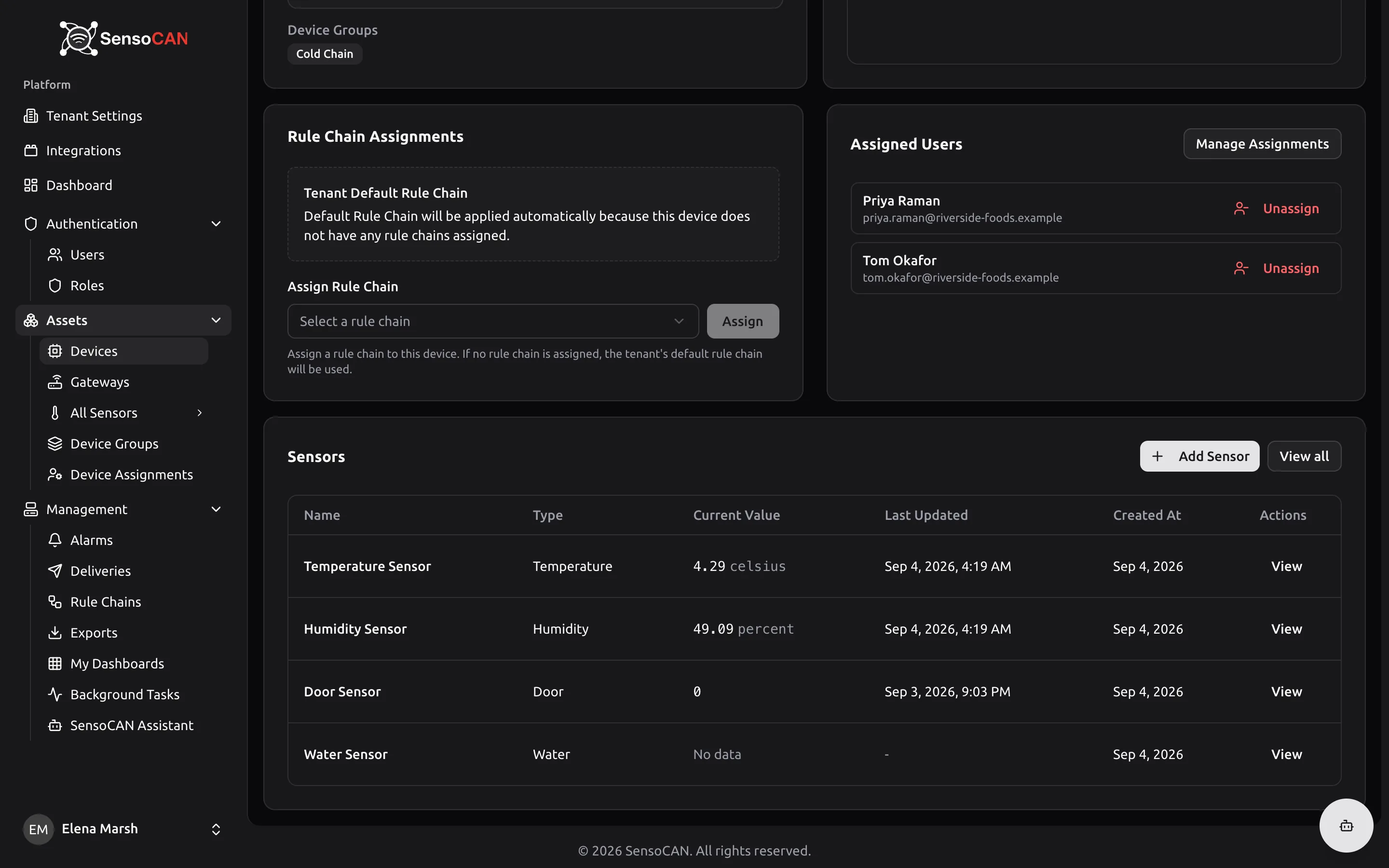
If Last connected is updating but every sensor reads "No data", the rule chain is not saving them — check Management → Rule Chains. If some sensors update and others do not, the identifiers for the silent ones do not match a sensor on this device, and the 404 body and the rejected counts have been saying so.
Everything returns 401. Confirm the token was not regenerated, and that the Device UUID in the URL is the device this token belongs to. A token that works for one device is rejected on another.
Buffered readings come back as duplicates. That is the expected answer to a replay. Treat them as delivered and move your buffer on.